
Click-to-call for multiple SIP clients with a single number
This article is about the PJSIP protocol. This feature is not supported by SIP.
This article gives an example of how to configure Asterisk dialplan for a situation when several SIP devices are assigned to one internal number. For example, it can be several physical phones or software clients using the same account. Dialplan distributes the call to all these devices when the call is initiated.
In the file /etc/asterisk/extensions_custom.conf add the code below
These settings are recommended to be done with the Asterisk administrator, as they affect the telephony itself, not just the Itgrix integration module.
This is an example of dialplan settings developed on a clean test server. Depending on your settings and Asterisk version, the code required for correct operation may differ.
[from-crm-click2call-example]

exten => _X.,1,NoOp(CRM Click2Call to ${EXTEN})

 ; call to all devices of the operator (the number is taken from Local/XXX@...)
 same => n,Set(CONTACTS=${PJSIP_DIAL_CONTACTS(${CUT(CUT(CHANNEL,/,2),@,1)})})
 same => n,GotoIf($["${CONTACTS}"=""]?no_contacts)

 same => n,Dial(${CONTACTS},30,g)

 ; ===== the operator answered =====
 same => n,Set(OPERATOR=${BRIDGEPEER(pjsip,endpoint)})
 same => n,NoOp(Answered by operator ${OPERATOR})

 ; CallerID
 same => n,Set(CALLERID(num)=${OPERATOR})
 same => n,Set(CALLERID(name)=CRM-Call)

 ; Calling the client
 same => n,Dial(Local/${EXTEN}@from-internal,60)

 same => n,Hangup()

exten => _X.,n(no_contacts)
 same => n,NoOp(No operator available)
 same => n,Hangup()
Update the dialplan from the console
asterisk -rx 'dialplan reload'In the settings of the integration module, specify the newly created context
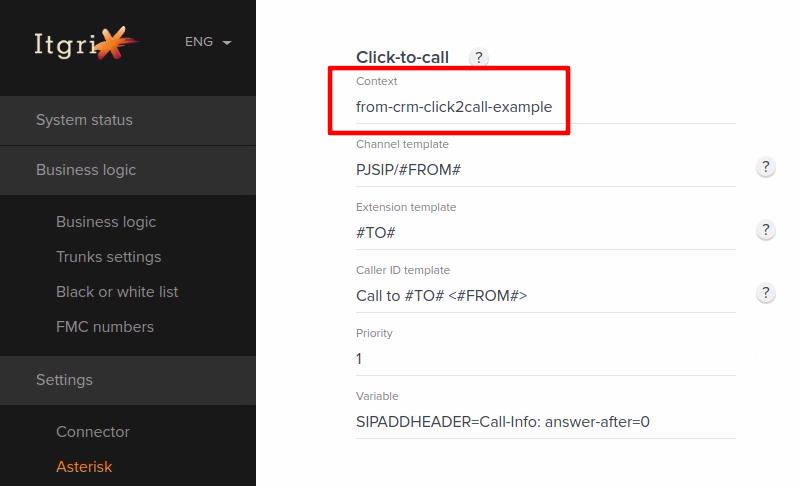
Save settings
When you make a click-to-call call from CRM, the call will be initiated on all devices connected to the corresponding extension.